Limited Blends: Difference between revisions
mNo edit summary |
mNo edit summary |
||
| (11 intermediate revisions by the same user not shown) | |||
| Line 1: | Line 1: | ||
==Introduction== | |||
<html><img src='https://cdn.cosmicclash.io/troopers/wiki/limited_blends_small.png'/></html><br /> | <html><img src='https://cdn.cosmicclash.io/troopers/wiki/limited_blends_small.png'/></html><br /> | ||
Limited Blends are one of the most exciting features of [[Outlaw Troopers]]! | [[Limited Blends]] are one of the most exciting features of [[Outlaw Troopers]]! Whenever you defeat a [[Dominator]] in an [[Encounter]], you have a chance to find an [[Encounter Fragments|Encounter Fragment]]. | ||
==What does "Limited" mean?== | |||
"Limited" means there is a hard cap on how many of these [[Assets]] can ever exist. Once the limit is reached, no more can be created. | |||
- [[Troopers]]: 30 per type. | |||
- [[Scientist|Scientists]]: 40 per type. | |||
- [[Gears]]: 50 per type. | |||
- [[Planet Deed]]: 300 per type. | |||
+2% chance to find | |||
==Limited Recipes== | |||
Each [[Blends|Blend]] requires you to burn (consume) specific [[Assets]] held in your [[Vault]]. | |||
===Limited Troopers=== | |||
- Mavix: 20 Wormfoil + 4 Frost Sword [[Troopers]] | |||
- Brewarm: 20 Grumbleblade + 4 C7-TKZ [[Troopers]] | |||
- Duchess DunVella: 20 Patch + 4 Avalon [[Troopers]] | |||
- Miss Mildri: 10 Wormfoil + 1 Lady Silksand [[Troopers]] | |||
- Admiral Purrington: 5 Phantom [[Troopers]] | |||
- Professor Moonglow: 5 Lady Silksand [[Troopers]] | |||
- Alpha The Pioneer: 1 [[Omega Qwitt]] | |||
- Beta The Saboteur: 6 [[Mega Qwitt|Mega Qwitts]] | |||
- Gamma The Explorer: 3 [[Cipherbot]] | |||
===Limited Scientists=== | |||
- Limited Scientist: 5 Epic [[Scientist|Scientists]] + 1 Legendary [[Scientist]] | |||
===Limited Gears=== | |||
All Limited Gears follow the same recipe: 10 Epic + 1 Legendary of the Base [[Gears|Gear]]. | |||
{| style="margin: 20px 0; border-collapse: collapse; background-color: #000; color: #fff; border: 1px solid #333; width: 80%; max-width: 700px; text-align: center; font-family: sans-serif;" | |||
|- style="background-color: #111; color: #00e5ff; text-transform: uppercase; letter-spacing: 1px; font-size: 0.9em;" | |||
! style="padding: 15px; border-bottom: 2px solid #00e5ff;" | Base Gear | |||
! style="padding: 15px; border-bottom: 2px solid #00e5ff; width: 50px;" | | |||
! style="padding: 15px; border-bottom: 2px solid #00e5ff;" | Limited Gear | |||
|- style="background-color: #080808;" | |||
| style="padding: 12px; border-bottom: 1px solid #1a1a1a;" | Lonewolf || style="color: #00e5ff; font-weight: bold;" | → || style="padding: 12px; border-bottom: 1px solid #1a1a1a; color: #00e5ff; font-weight: bold;" | Isolator | |||
|- | |||
| style="padding: 12px; border-bottom: 1px solid #1a1a1a;" | Ghost || style="color: #00e5ff; font-weight: bold;" | → || style="padding: 12px; border-bottom: 1px solid #1a1a1a; color: #00e5ff; font-weight: bold;" | Spectral | |||
|- style="background-color: #080808;" | |||
| style="padding: 12px; border-bottom: 1px solid #1a1a1a;" | Wingman || style="color: #00e5ff; font-weight: bold;" | → || style="padding: 12px; border-bottom: 1px solid #1a1a1a; color: #00e5ff; font-weight: bold;" | Converter | |||
|- | |||
| style="padding: 12px; border-bottom: 1px solid #1a1a1a;" | Unstable Calibrator || style="color: #00e5ff; font-weight: bold;" | → || style="padding: 12px; border-bottom: 1px solid #1a1a1a; color: #00e5ff; font-weight: bold;" | Stasis Device | |||
|- style="background-color: #080808;" | |||
| style="padding: 12px; border-bottom: 1px solid #1a1a1a;" | Engine Amplifier || style="color: #00e5ff; font-weight: bold;" | → || style="padding: 12px; border-bottom: 1px solid #1a1a1a; color: #00e5ff; font-weight: bold;" | Graviton Thruster | |||
|- | |||
| style="padding: 12px; border-bottom: 1px solid #1a1a1a;" | Mini Warp Drive || style="color: #00e5ff; font-weight: bold;" | → || style="padding: 12px; border-bottom: 1px solid #1a1a1a; color: #00e5ff; font-weight: bold;" | Warpstrike | |||
|- style="background-color: #080808;" | |||
| style="padding: 12px; border-bottom: 1px solid #1a1a1a;" | Constructor || style="color: #00e5ff; font-weight: bold;" | → || style="padding: 12px; border-bottom: 1px solid #1a1a1a; color: #00e5ff; font-weight: bold;" | Forger | |||
|- | |||
| style="padding: 12px; border-bottom: 1px solid #1a1a1a;" | Armor Repair Kit || style="color: #00e5ff; font-weight: bold;" | → || style="padding: 12px; border-bottom: 1px solid #1a1a1a; color: #00e5ff; font-weight: bold;" | Siphoner | |||
|- style="background-color: #080808;" | |||
| style="padding: 12px; border-bottom: 1px solid #1a1a1a;" | Explosive Ammo || style="color: #00e5ff; font-weight: bold;" | → || style="padding: 12px; border-bottom: 1px solid #1a1a1a; color: #00e5ff; font-weight: bold;" | Quantum Ammo | |||
|- | |||
| style="padding: 12px; border-bottom: 1px solid #1a1a1a;" | AI Defense System || style="color: #00e5ff; font-weight: bold;" | → || style="padding: 12px; border-bottom: 1px solid #1a1a1a; color: #00e5ff; font-weight: bold;" | Skyburst Mine | |||
|- style="background-color: #080808;" | |||
| style="padding: 12px; border-bottom: 1px solid #1a1a1a;" | Scavenger || style="color: #00e5ff; font-weight: bold;" | → || style="padding: 12px; border-bottom: 1px solid #1a1a1a; color: #00e5ff; font-weight: bold;" | Shattermine | |||
|- | |||
| style="padding: 12px; border-bottom: 1px solid #1a1a1a;" | Weapon Amplifier || style="color: #00e5ff; font-weight: bold;" | → || style="padding: 12px; border-bottom: 1px solid #1a1a1a; color: #00e5ff; font-weight: bold;" | Nemesis | |||
|- style="background-color: #080808;" | |||
| style="padding: 12px; border-bottom: 1px solid #1a1a1a;" | Distractor || style="color: #00e5ff; font-weight: bold;" | → || style="padding: 12px; border-bottom: 1px solid #1a1a1a; color: #00e5ff; font-weight: bold;" | Retributor | |||
|- | |||
| style="padding: 12px; border-bottom: 1px solid #1a1a1a;" | Nanovirus || style="color: #00e5ff; font-weight: bold;" | → || style="padding: 12px; border-bottom: 1px solid #1a1a1a; color: #00e5ff; font-weight: bold;" | Nanoburst | |||
|- | |||
| style="padding: 12px; border-bottom: 1px solid #1a1a1a;" | Armor Plate || style="color: #00e5ff; font-weight: bold;" | → || style="padding: 12px; border-bottom: 1px solid #1a1a1a; color: #00e5ff; font-weight: bold;" | Reinforced Armor | |||
|- | |||
| style="padding: 12px; border-bottom: 1px solid #1a1a1a;" | Shield Amplifier || style="color: #00e5ff; font-weight: bold;" | → || style="padding: 12px; border-bottom: 1px solid #1a1a1a; color: #00e5ff; font-weight: bold;" | Shield Matrix | |||
|- | |||
| style="padding: 12px; border-bottom: 1px solid #1a1a1a;" | Stealth Device || style="color: #00e5ff; font-weight: bold;" | → || style="padding: 12px; border-bottom: 1px solid #1a1a1a; color: #00e5ff; font-weight: bold;" | Specter Core | |||
|- | |||
| style="padding: 12px; border-bottom: 1px solid #1a1a1a;" | Shield Booster || style="color: #00e5ff; font-weight: bold;" | → || style="padding: 12px; border-bottom: 1px solid #1a1a1a; color: #00e5ff; font-weight: bold;" | Shield Bomb | |||
|} | |||
==Limited Gear Bonus== | |||
Owning [[Gears|Limited Gears]] makes it easier to find [[Encounter Fragments]]. | |||
- Bonus: Each [[Gears|Limited Gear]] you own adds a +2% chance to find an [[Encounter Fragments|Encounter Fragment]]. | |||
- Cap: This bonus is capped at 20%. | |||
- Check Stats: View your current bonus in [[Resource Stats]]. | |||
==How to Blend== | |||
- Make sure your Limited Blend Voucher and all ingredient [[Assets]] are located in your [[Vault]]. | |||
- Open the [[Vault]] and click the Blend tab. | |||
- Go to the Vouchers sub-tab. | |||
- Find your recipe and click Initiate [[Blends|Blend]]. | |||
Note: All items must be held in the [[Vault]] to perform the [[Blends|Blend]]. You cannot deposit NFTs directly from an external wallet into the [[Vault]] for [[Blends|Blending]]. | |||
Latest revision as of 12:21, 14 October 2026
Introduction
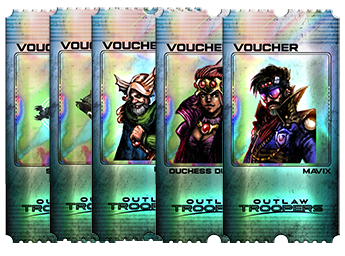
Limited Blends are one of the most exciting features of Outlaw Troopers! Whenever you defeat a Dominator in an Encounter, you have a chance to find an Encounter Fragment.
What does "Limited" mean?
"Limited" means there is a hard cap on how many of these Assets can ever exist. Once the limit is reached, no more can be created.
- Troopers: 30 per type.
- Scientists: 40 per type.
- Gears: 50 per type.
- Planet Deed: 300 per type.
Limited Recipes
Each Blend requires you to burn (consume) specific Assets held in your Vault.
Limited Troopers
- Mavix: 20 Wormfoil + 4 Frost Sword Troopers
- Brewarm: 20 Grumbleblade + 4 C7-TKZ Troopers
- Duchess DunVella: 20 Patch + 4 Avalon Troopers
- Miss Mildri: 10 Wormfoil + 1 Lady Silksand Troopers
- Admiral Purrington: 5 Phantom Troopers
- Professor Moonglow: 5 Lady Silksand Troopers
- Alpha The Pioneer: 1 Omega Qwitt
- Beta The Saboteur: 6 Mega Qwitts
- Gamma The Explorer: 3 Cipherbot
Limited Scientists
- Limited Scientist: 5 Epic Scientists + 1 Legendary Scientist
Limited Gears
All Limited Gears follow the same recipe: 10 Epic + 1 Legendary of the Base Gear.
| Base Gear | Limited Gear | |
|---|---|---|
| Lonewolf | → | Isolator |
| Ghost | → | Spectral |
| Wingman | → | Converter |
| Unstable Calibrator | → | Stasis Device |
| Engine Amplifier | → | Graviton Thruster |
| Mini Warp Drive | → | Warpstrike |
| Constructor | → | Forger |
| Armor Repair Kit | → | Siphoner |
| Explosive Ammo | → | Quantum Ammo |
| AI Defense System | → | Skyburst Mine |
| Scavenger | → | Shattermine |
| Weapon Amplifier | → | Nemesis |
| Distractor | → | Retributor |
| Nanovirus | → | Nanoburst |
| Armor Plate | → | Reinforced Armor |
| Shield Amplifier | → | Shield Matrix |
| Stealth Device | → | Specter Core |
| Shield Booster | → | Shield Bomb |
Limited Gear Bonus
Owning Limited Gears makes it easier to find Encounter Fragments.
- Bonus: Each Limited Gear you own adds a +2% chance to find an Encounter Fragment.
- Cap: This bonus is capped at 20%.
- Check Stats: View your current bonus in Resource Stats.
How to Blend
- Make sure your Limited Blend Voucher and all ingredient Assets are located in your Vault.
- Open the Vault and click the Blend tab.
- Go to the Vouchers sub-tab.
- Find your recipe and click Initiate Blend.
Note: All items must be held in the Vault to perform the Blend. You cannot deposit NFTs directly from an external wallet into the Vault for Blending.