Blends: Difference between revisions
mNo edit summary |
mNo edit summary |
||
| (One intermediate revision by the same user not shown) | |||
| Line 1: | Line 1: | ||
==Introduction== | ==Introduction== | ||
<html><img height=300 src='https://misc.outlawtroopers.io/images/blend1.png?'/></html> | |||
Blending is the crafting, upgrading and converting system in the [[Vault]]. | Blending is the crafting, upgrading and converting system in the [[Vault]]. | ||
| Line 7: | Line 9: | ||
- [[Assets]] held in an external blockchain wallet cannot be used for Blending. | - [[Assets]] held in an external blockchain wallet cannot be used for Blending. | ||
- You can no longer deposit [[Assets]] from a wallet into the [[Vault]]. If you plan to [[Blend]], ensure you acquire or trade for "Vaulted" versions of the items. | - You can no longer deposit [[Assets]] from a wallet into the [[Vault]]. If you plan to [[Blend]], ensure you acquire or trade for "Vaulted" versions of the required items. | ||
==Blend Categories== | ==Blend Categories== | ||
In the Vault → Blend tab, there are four main categories: | In the Vault → Blend tab, there are four main categories: | ||
===Vouchers=== | ===Vouchers=== | ||
Use this tab to [[Blend]] voucher items. | |||
- Limited Vouchers: Used to craft [[Limited Blends]] like Limited [[Troopers]] or Limited [[Gears]]. | - Limited Vouchers: Used to craft [[Limited Blends]] like Limited [[Troopers]] or Limited [[Gears]]. | ||
- Unlimited Vouchers: Used | - Unlimited Vouchers: Used to craft standard items like [[Gear]] vouchers or [[Mega Qwitt]] [[Blends]]. | ||
===Rarity Upgrades=== | ===Rarity Upgrades=== | ||
This tab | This tab lets you upgrade lower-tier [[Assets]] into higher-tier ones. | ||
- [[Ships]]: Combine 10 [[Ships]] of the same rarity to receive 1 random [[Ship]] of the next rarity | - [[Ships]]: Combine 10 [[Ships]] of the same rarity to receive 1 random [[Ship]] of the next rarity (e.g., 10 Common [[Ships]] → 1 random Rare [[Ship]]). | ||
- [[Troopers]]: Create Guardians [[Troopers]] by consuming lower-rarity units. | - [[Troopers]]: Create Guardians [[Troopers]] by consuming lower-rarity units. | ||
*Ironwoof: | *Ironwoof: Any 5 Common [[Troopers]]. | ||
*Packlord: | *Packlord: Any 5 Rare [[Troopers]]. | ||
*Starchewer: | *Starchewer: Any 5 Epic [[Troopers]]. | ||
===Ship Converting=== | ===Ship Converting=== | ||
This tab is | This tab is for players who own Cosmic Clash [[Ships]] and want to use them in [[Outlaw Troopers]]. | ||
- Derelict & Expiring Soon: | - Derelict & Expiring Soon: | ||
*Common & Rare Ships: Convert 2 Cosmic Clash [[Ships]] of the same rarity into 1 random [[Outlaw Troopers]] [[Ship]] of the same rarity. | *Common & Rare Ships: Convert 2 Cosmic Clash [[Ships]] of the same rarity into 1 random [[Outlaw Troopers]] [[Ship]] of the same rarity. | ||
*Epic & Legendary Ships: Convert 1 Cosmic Clash [[Ship]] | *Epic & Legendary Ships: Convert 1 Cosmic Clash [[Ship]] into 1 random [[Outlaw Troopers]] [[Ship]] of the same rarity. | ||
- Blendable & Limited: | - Blendable & Limited: | ||
| Line 42: | Line 44: | ||
===Deck Crafting=== | ===Deck Crafting=== | ||
Decks are bundles | [[Decks]] are bundles that contain a mix of [[Troopers]], [[Ships]], [[Qwitts]] and more. Crafting a [[Deck]] costs [[Kroc]]. | ||
==How to Perform a Blend== | ==How to Perform a Blend== | ||
Latest revision as of 13:09, 4 February 2026
Introduction
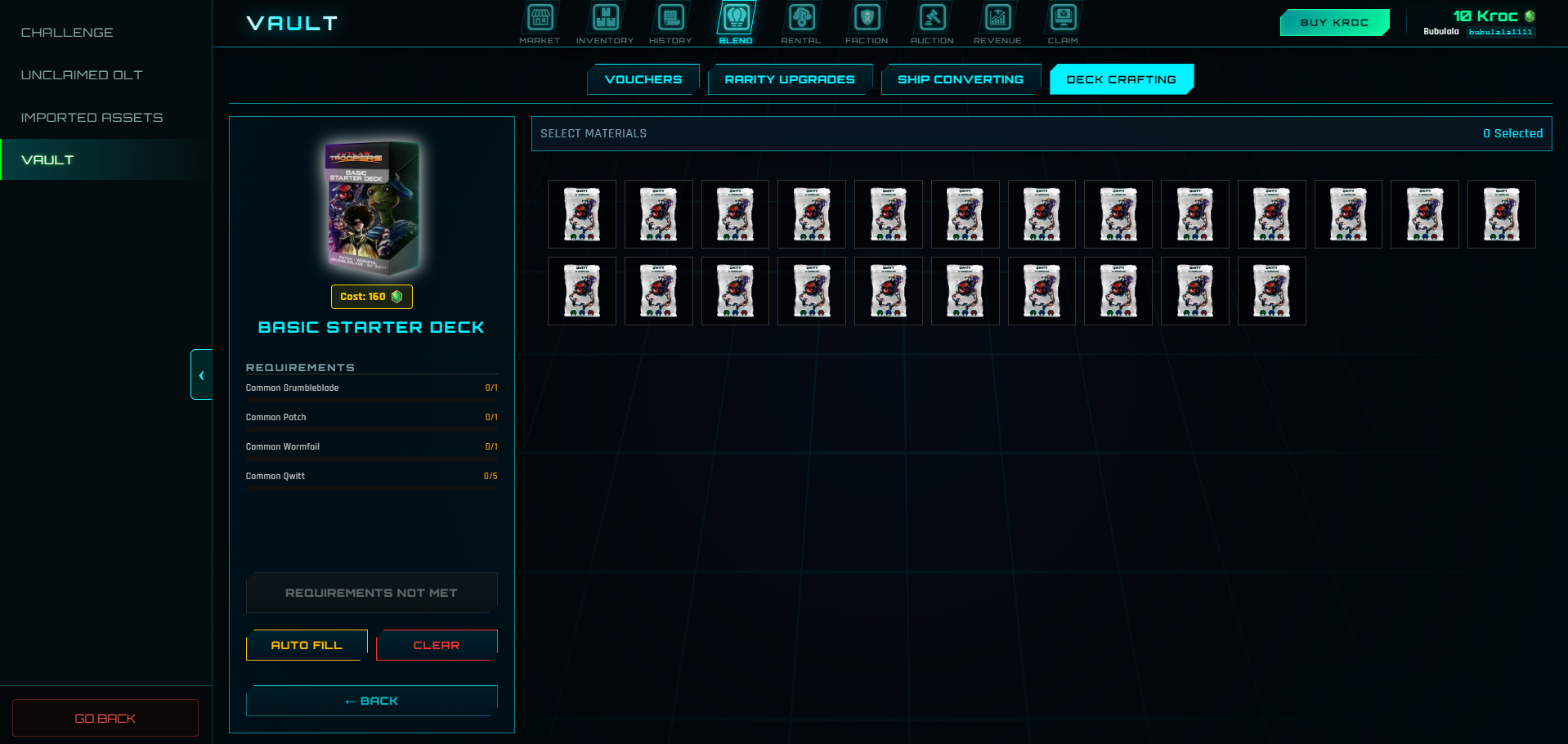
Blending is the crafting, upgrading and converting system in the Vault.
Rule of Blending
To perform any Blend, all required ingredients must be located in your Vault.
- Assets held in an external blockchain wallet cannot be used for Blending.
- You can no longer deposit Assets from a wallet into the Vault. If you plan to Blend, ensure you acquire or trade for "Vaulted" versions of the required items.
Blend Categories
In the Vault → Blend tab, there are four main categories:
Vouchers
Use this tab to Blend voucher items.
- Limited Vouchers: Used to craft Limited Blends like Limited Troopers or Limited Gears.
- Unlimited Vouchers: Used to craft standard items like Gear vouchers or Mega Qwitt Blends.
Rarity Upgrades
This tab lets you upgrade lower-tier Assets into higher-tier ones.
- Ships: Combine 10 Ships of the same rarity to receive 1 random Ship of the next rarity (e.g., 10 Common Ships → 1 random Rare Ship).
- Troopers: Create Guardians Troopers by consuming lower-rarity units.
- Ironwoof: Any 5 Common Troopers.
- Packlord: Any 5 Rare Troopers.
- Starchewer: Any 5 Epic Troopers.
Ship Converting
This tab is for players who own Cosmic Clash Ships and want to use them in Outlaw Troopers.
- Derelict & Expiring Soon:
- Common & Rare Ships: Convert 2 Cosmic Clash Ships of the same rarity into 1 random Outlaw Troopers Ship of the same rarity.
- Epic & Legendary Ships: Convert 1 Cosmic Clash Ship into 1 random Outlaw Troopers Ship of the same rarity.
- Blendable & Limited:
- Convert 1 Cosmic Clash Ship into 1 Outlaw Troopers Ship of the same specific type and rarity.
Deck Crafting
Decks are bundles that contain a mix of Troopers, Ships, Qwitts and more. Crafting a Deck costs Kroc.
How to Perform a Blend
- Open the Vault and click the Blend tab.
- Select the appropriate sub-tab (e.g., Rarity Upgrades).
- Click View Recipe on the item you wish to create.
- If you have all the required ingredients in your Vault, click Initiate Blend.
- Ingredients are consumed, and your new Asset will appear in your Vault inventory.