Getting Started
Overview
This guide helps new players learn the basics of Outlaw Troopers, set up their accounts, navigate the UI, and get started with core game features.
Step 1: Login & Account Setup
Access the game here: https://play.outlawtroopers.io/
- Email Login: Register with your email to save your progress.
- Guest Play: Start instantly without an account. (Note: Progress is temporary and saved only to your browser cache.)
- Link Wallet (Optional): Link your wallet to use your NFTs or migrate old progress (fragments, vault assets, and unclaimed prizes).
⚠️ IMPORTANT: Wallet Linking is Permanent
- No Changes: Once a wallet address is tied to your email, it cannot be removed or changed.
- One Link Only: Each email address can only be linked to one wallet address.
- Switching Wallets: If you want to use a different wallet or a different blockchain, you must register a new email address.
Step 2: Select Your Regional Server
The game uses regional servers to provide the best performance and speed.
- Regions: Choose between US, EU or Asia.
- Regional Progression: Your Empire level, credits, and progress are unique to each server. They do not transfer between regions.
- Multi-Play: You can build a different Empire on every server using the same account (e.g., one on SG and one on EU).
Step 3: Import & Manage Your Assets (For Wallet Users)
You must manually choose which assets to bring into which server.
- Import Asset: To use an asset (e.g., Ship, Gear, etc.), you must import it to a specific server. Once imported, they are available for use on that specific server.
- Manage Assets: You can unimport an asset from one server and import it to another at any time. This allows you to move your assets (e.g. Troopers and Gears between your different regional Empires.)
- Active Binding: If you sell an asset and the new owner imports it to their account, that item will be automatically removed from your account.
Step 4: Start Playing
Once you've selected your server, you can dive into the game!
Tutorial & Unlocks
- Follow the tutorial to unlock features gradually.
- Not all tabs or features are available at the start; completing the tutorial will unlock them.
- You can choose to skip the tutorial via the Settings button, but it's highly recommended that you follow and complete the tutorial especially for new players.
Interactive Top Bar
The resource icons at the top of the Main Interface are more than just counters, they are also shortcuts.
You can click these icons to jump directly to specific menus. For example:
- Credits: Opens the Black Market.
- Radioactive Shard: Opens the Purification UI.
- Artifacts: Opens The Abyss menu.
We encourage players to explore these shortcuts to find the fastest way to navigate the game!
⚠️ Note: These shortcuts only become active after you have progressed far enough in the tutorial to unlock the corresponding features. If clicking them does nothing, continue following the tutorial tasks!
Bottom UI Bar
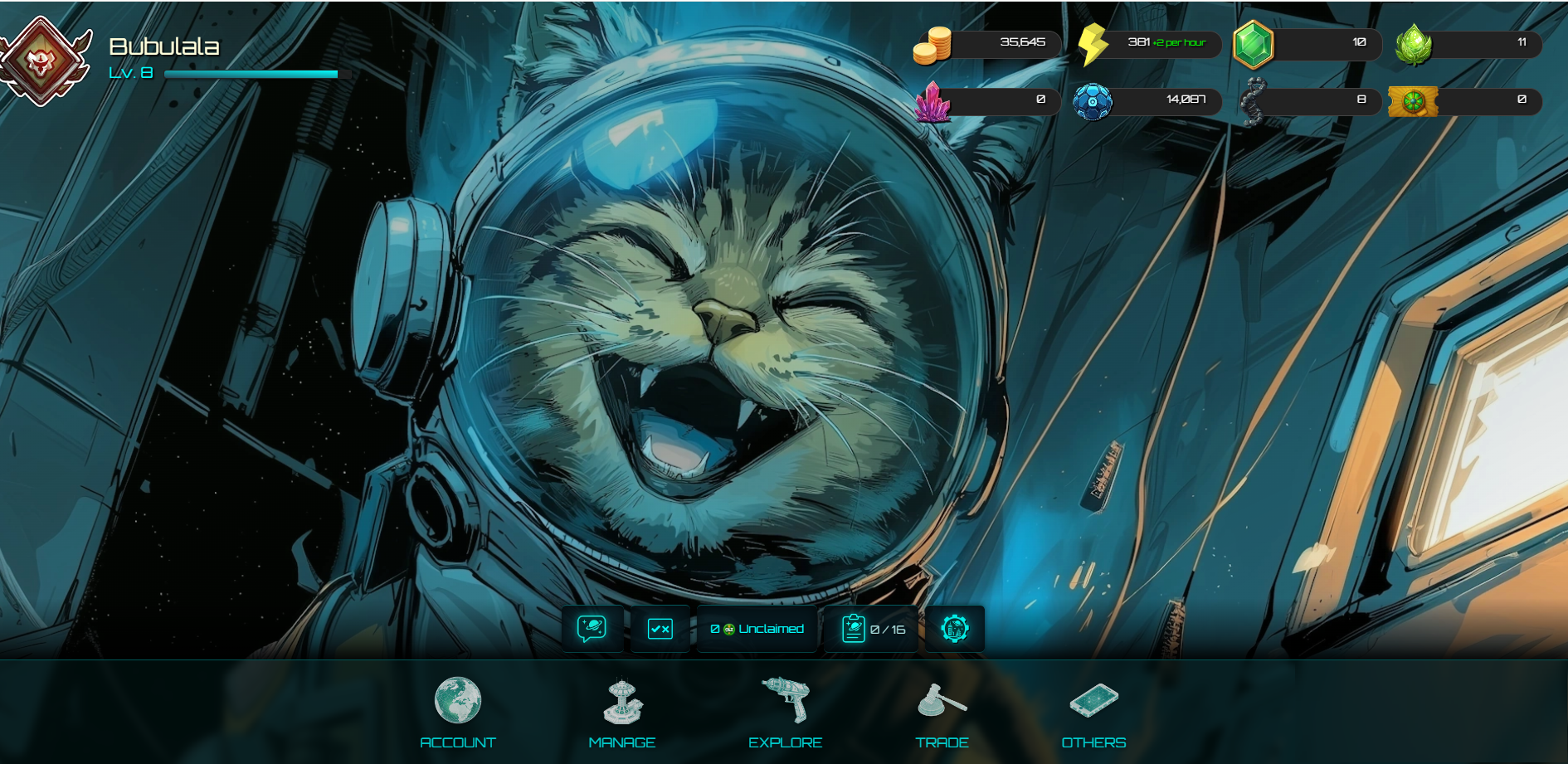
Some tabs are locked at first and unlock as you progress through the tutorial.
- Account: Challenge, Unclaimed OLT, Collection, FGL Vault
- Manage: Companion, Spacefarer, Tech Tree, Planet, Fragment, Clan, Resource Stats
- Explore: Encounters, The Abyss, A.R.C Quest, Ship Battle, Daily Bounty, AW Weekly
- Trade: Ship Forger, Inventory, Smuggling, FBX System, Purifying Shards, Joe's Shop
- Others: Leaderboard, What is OLT, What is Energy, Buy Me a Coffee, Wiki
Settings Button
- Settings
- Patch Notes
- Skip Tutorial
Next Steps
Once familiar with the UI and tutorial, try:
- Encounters: Start your first battles and learn the basics in the Encounter Guide. (Tip: For smoother battles, choose your preferred server for Encounters in Settings.)
- The Abyss: Craft and upgrade Biocrafts, explore deeper through Delving, and fight in the Arena.
- Spacefarer: Assign Companions and Troopers to passive missions for rewards.