FBX System: Difference between revisions
Jump to navigation
Jump to search
No edit summary |
m (→How It Works?) |
||
| (80 intermediate revisions by 2 users not shown) | |||
| Line 1: | Line 1: | ||
< | <html><img width=500 src='https://misc.outlawtroopers.io/images/fbx.png?'/></html> | ||
Players can exchange their [[Lifeforces]] into [[OLT Tokens]] via the [[FBX System]]. All exchanges are batch processed daily at 16:00 UTC, which means the final exchange ratio is only calculated and finalized at that time. | |||
</pre> | |||
==How to Access== | |||
- Go to Trade → FBX System. | |||
- Shortcut: Click the [[Lifeforces]] icon at the top of the Main Interface for direct access. | |||
==How It Works?== | |||
- Step 1: Get [[Credits]] | |||
There are MANY ways to get [[Credits]]: | |||
*Run [[Galaxy Missions]] | |||
*Complete [[A.R.C Quests]] | |||
*Complete [[Bounty]] | |||
*Clear Credit Nodes in [[Encounters]] | |||
*Sell items on the [[Black Market]] | |||
*Participate in [[Expedition]] | |||
*Defeat Zarath in [[Dark Depths]] | |||
*[[Scientists]] generate [[Credits]] over time | |||
*[[Space Station]] generates [[Credits]] over time | |||
- Step 2: Mine [[Lifeforce]] | |||
Use your [[Credits]] to mine [[Lifeforce]] on [[Planets]]. | |||
In-game: Manage → Planet → Mine Lifeforce | |||
*Higher “Mining Rate” [[Planets]] give better returns. | |||
*[[Mining Assets]] can mine beyond the normal limit (advantage on high-rate [[Planets]]). | |||
*If [[Planets]] are full, hire [[Captain Pawsome]] to Auto-Mine when space becomes available. | |||
👉 See [[Lifeforce]] for full mining details, costs, rates, and auto-mining. | |||
- Step 3: Submit to the [[FBX]] | |||
Once you have collected some [[Lifeforces]], head on over to the [[FBX System]] tab and submit your [[Lifeforces]]! | |||
==Summary Flow== | |||
<pre> Credits → Lifeforce → FBX → OLT </pre> | |||
Latest revision as of 18:17, 2 February 2026
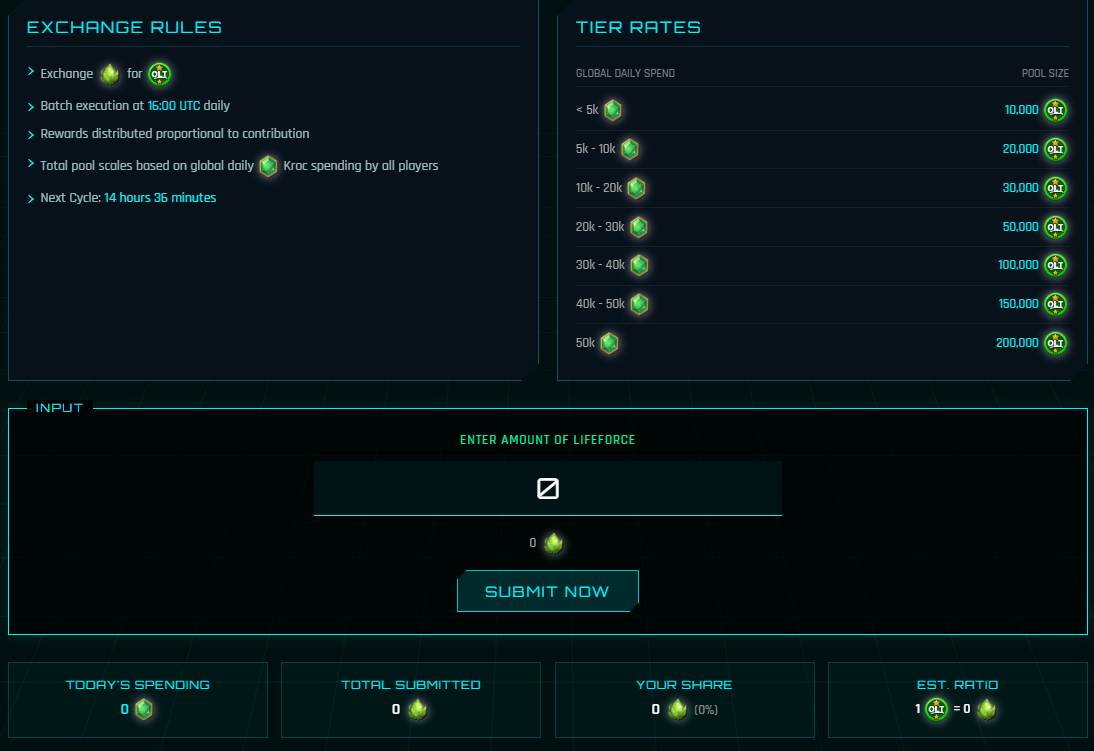
Players can exchange their Lifeforces into OLT Tokens via the FBX System. All exchanges are batch processed daily at 16:00 UTC, which means the final exchange ratio is only calculated and finalized at that time.
How to Access
- Go to Trade → FBX System.
- Shortcut: Click the Lifeforces icon at the top of the Main Interface for direct access.
How It Works?
- Step 1: Get Credits
There are MANY ways to get Credits:
- Run Galaxy Missions
- Complete A.R.C Quests
- Complete Bounty
- Clear Credit Nodes in Encounters
- Sell items on the Black Market
- Participate in Expedition
- Defeat Zarath in Dark Depths
- Scientists generate Credits over time
- Space Station generates Credits over time
- Step 2: Mine Lifeforce
Use your Credits to mine Lifeforce on Planets.
In-game: Manage → Planet → Mine Lifeforce
- Higher “Mining Rate” Planets give better returns.
- Mining Assets can mine beyond the normal limit (advantage on high-rate Planets).
- If Planets are full, hire Captain Pawsome to Auto-Mine when space becomes available.
👉 See Lifeforce for full mining details, costs, rates, and auto-mining.
- Step 3: Submit to the FBX
Once you have collected some Lifeforces, head on over to the FBX System tab and submit your Lifeforces!
Summary Flow
Credits → Lifeforce → FBX → OLT