Encounter Guide: Difference between revisions
mNo edit summary |
m (→Tiers) |
||
| (101 intermediate revisions by the same user not shown) | |||
| Line 1: | Line 1: | ||
<html>< | ==Overview== | ||
<html>< | Encounters are the core PvE mode of [[Outlaw Troopers]]. Explore maps and defeat enemies to earn resources and grow your [[Empire]]. | ||
===What You Earn=== | |||
- Resources: [[Credits]], [[Gears]], [[OLT Tokens]], [[Sacred Gene]], and [[Radioactive Shards]]. | |||
- Progression: [[Prestige]] and [[Reputation]] for the [[Leaderboards]]. | |||
- Other Rewards: [[Encounter Fragments]] (from [[Dominators]]) used for [[Limited Blends]], and progress toward [[A.R.C. Quests]]. | |||
==How to Start== | |||
<html><img height=285 src='https://misc.outlawtroopers.io/images/tierselection3.png?'/></html> <html><img height=285 src='https://misc.outlawtroopers.io/images/build.png?'/></html> | |||
- Go to Explore -> Encounters. | |||
- Select a Tier: Choose your difficulty. You can view Sector Intel (Map Layout and rewards) and the Hostile DB (enemy types) before entering. | |||
- Setup Build: Click "Initiate Encounter" to customize your loadout. | |||
*Select your [[Ship]], [[Trooper]], [[Gears]], and [[Skills]]. | |||
*Review your offensive and defensive stats on the right. | |||
*Use Load to quickly apply a previous loadout. | |||
Note: The game automatically saves your most recent build for quick deployment. | |||
Click | - Deploy: Click "Deploy" to pay the entry cost using [[Energy]] or a [[Discount Access Key]]. | ||
== | ==Tiers== | ||
There are unlimited Tiers to explore. Defeat the boss node to unlock the next Tier. | |||
- Training Tiers (1–4): Free to enter. These are for learning the game and do not reward [[Reputation]] or [[Credits]]. Map rerolling is unavailable. | |||
- Standard Tiers (5+): Require [[Energy]] to enter. Costs and rewards increase every 4 Tiers (e.g., Tiers 5–8 share the same cost/rewards; Tiers 9–12 increase, and so on). | |||
- Cleared Tiers: Boss node defeated. These can be rerolled for new Layouts. | |||
- The [[ | - Uncleared Tiers: Boss node not defeated. The Map Layout is fixed, [[Credit]] nodes are unavailable, and [[Discount Access Key]] cannot be used. Note: The chance of encountering combat is increased when attempting uncleared Tiers. | ||
==Map Layouts & Rerolling== | |||
If you do not like your current map rewards, you can reroll the Layout (available for cleared Tiers only). | |||
- Tier Specific: Each Tier saves its own Layout. Rerolling one Tier does not affect others. | |||
- Cost: Each reroll costs [[Normal Access Keys]] (5x the Tier’s [[Energy]] cost). | |||
- Free Reroll: Granted after completing an Encounter. These always generate a 3x3 map and cannot contain [[Sacred Gene]] or [[OLT]] nodes. | |||
- Minimum rerolled map size: 3 × 3 | |||
- Maximum rerolled map size: 6 x 5 | |||
- Sacred Gene Safety: You cannot reroll a map that contains a [[Sacred Gene]]. Because these are rare and highly valuable on the [[Black Market]], this safety feature prevents you from accidentally rolling over a high-value node. | |||
==Encounter Rules & Reward Mechanics== | |||
Encounters use a "node-based" system that rewards you for every step you take. | |||
- Keep Your Loot: You earn rewards for every node you clear. Even if you fail the Encounter or die at the Boss, you keep all [[Reputation]] and items earned during the run. | |||
- Node Scaling: Within a single Encounter, each cleared node increases difficulty by 10% and increases rewards ([[Credits]], [[Gears]], [[OLT]]) by 5%. | |||
- Energy Scaling: Rewards scale based on the Tier's base [[Energy]] cost. | |||
- End Conditions: An Encounter ends when you defeat the Boss node or your [[Ship]] is destroyed. | |||
==Node Queue== | |||
The Queue System lets you plan your path and automate combat. | |||
- Automate Pathing: Click multiple nodes to create a path. Your [[Ship]] will travel and process them in order. | |||
- Unqueue: Click a numbered node again to remove it from the queue. | |||
- Pause/Resume: Use Pause Queue to stop between nodes. Click Resume Queue to continue. | |||
- Reliability: If a connection error occurs, the system retries automatically. If it fails, the queue pauses at your current location. Simply click Resume Queue to continue. | |||
== | ==Setup Mechanics== | ||
- [[Ship]] Stacking: Owning multiple copies of the same [[Ship]] (virtual or permanent [[Assets]]) increases its level and base stats automatically. | |||
- [[Trooper]] [[Boons]]: Each [[Trooper]] provides unique "Active Boons" that changes daily. These are shown during the [[Troopers]] selection process. | |||
- [[Gear]] Score: Your total equipped [[Gear]] cannot exceed your [[Gear Score Limit]]. This limit can be increased via the [[Tech Tree]]. | |||
- [[Default Skills]]: Choose 3 skills for battle. Upgrade them using [[Credits]] to improve effectiveness. | |||
- Combat: For details on damage, defense, and effects, see [[Encounter Combat Mechanic]]. | |||
Latest revision as of 10:09, 25 June 2026
Overview
Encounters are the core PvE mode of Outlaw Troopers. Explore maps and defeat enemies to earn resources and grow your Empire.
What You Earn
- Resources: Credits, Gears, OLT Tokens, Sacred Gene, and Radioactive Shards.
- Progression: Prestige and Reputation for the Leaderboards.
- Other Rewards: Encounter Fragments (from Dominators) used for Limited Blends, and progress toward A.R.C. Quests.
How to Start
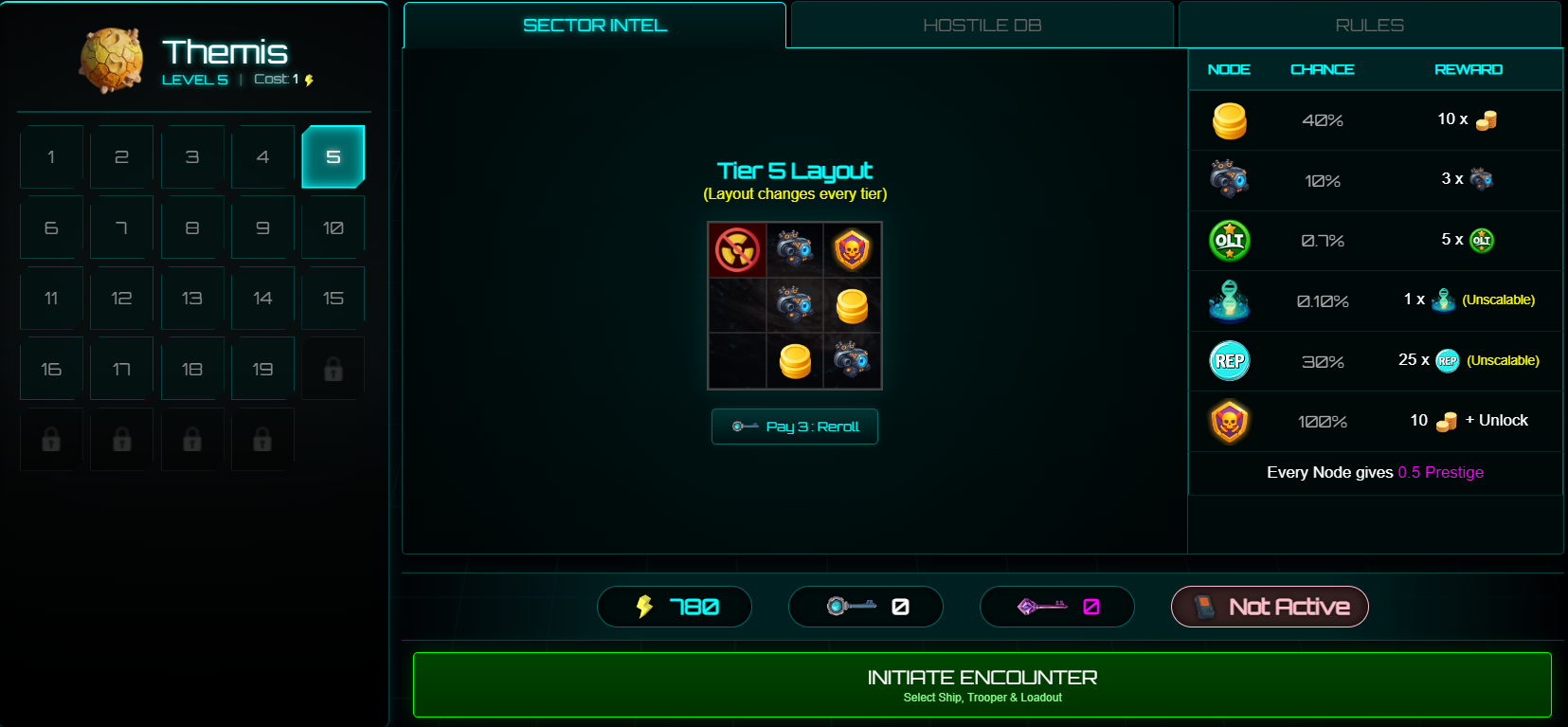
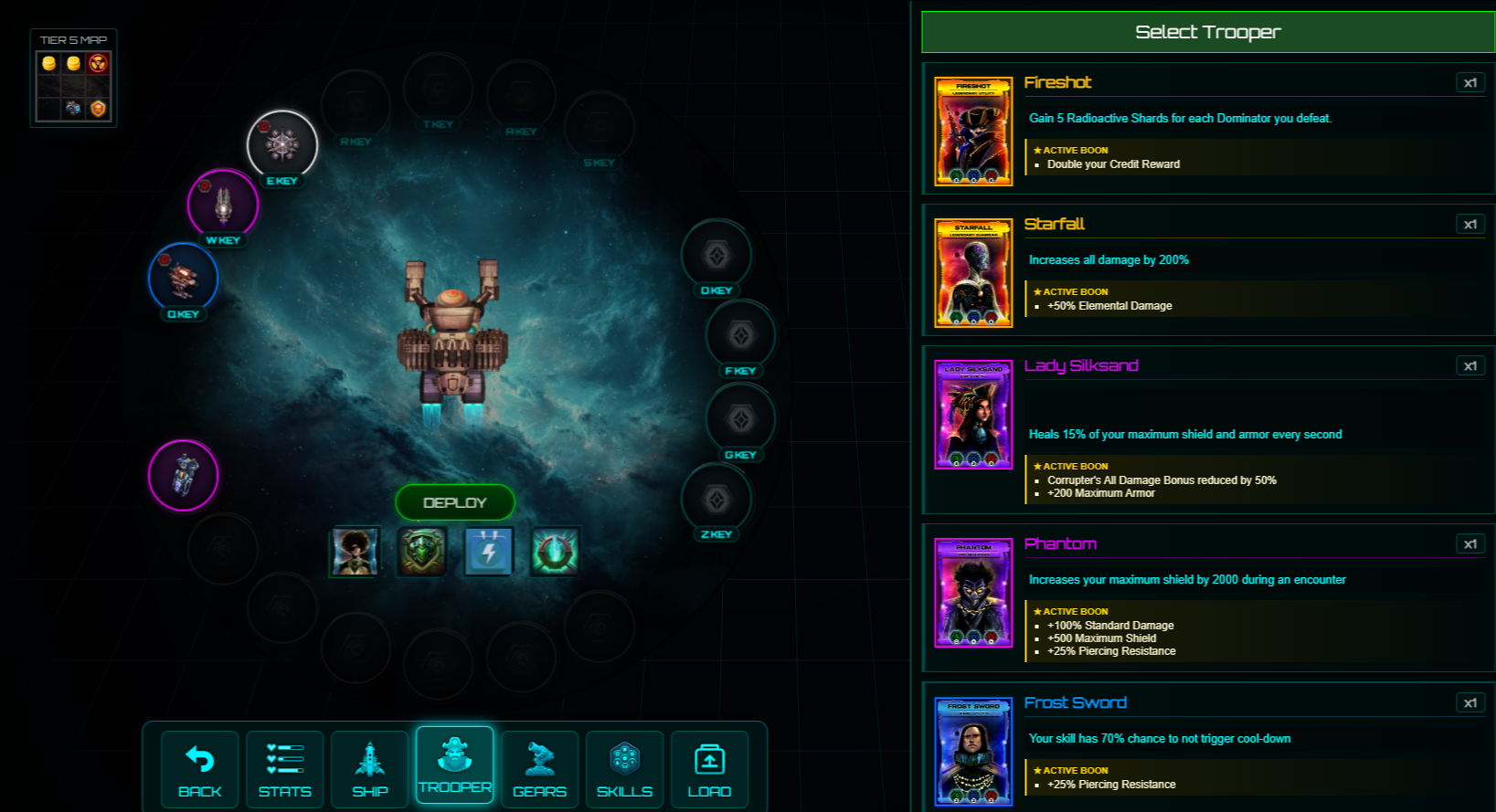
- Go to Explore -> Encounters.
- Select a Tier: Choose your difficulty. You can view Sector Intel (Map Layout and rewards) and the Hostile DB (enemy types) before entering.
- Setup Build: Click "Initiate Encounter" to customize your loadout.
- Review your offensive and defensive stats on the right.
- Use Load to quickly apply a previous loadout.
Note: The game automatically saves your most recent build for quick deployment.
- Deploy: Click "Deploy" to pay the entry cost using Energy or a Discount Access Key.
Tiers
There are unlimited Tiers to explore. Defeat the boss node to unlock the next Tier.
- Training Tiers (1–4): Free to enter. These are for learning the game and do not reward Reputation or Credits. Map rerolling is unavailable.
- Standard Tiers (5+): Require Energy to enter. Costs and rewards increase every 4 Tiers (e.g., Tiers 5–8 share the same cost/rewards; Tiers 9–12 increase, and so on).
- Cleared Tiers: Boss node defeated. These can be rerolled for new Layouts.
- Uncleared Tiers: Boss node not defeated. The Map Layout is fixed, Credit nodes are unavailable, and Discount Access Key cannot be used. Note: The chance of encountering combat is increased when attempting uncleared Tiers.
Map Layouts & Rerolling
If you do not like your current map rewards, you can reroll the Layout (available for cleared Tiers only).
- Tier Specific: Each Tier saves its own Layout. Rerolling one Tier does not affect others.
- Cost: Each reroll costs Normal Access Keys (5x the Tier’s Energy cost).
- Free Reroll: Granted after completing an Encounter. These always generate a 3x3 map and cannot contain Sacred Gene or OLT nodes.
- Minimum rerolled map size: 3 × 3
- Maximum rerolled map size: 6 x 5
- Sacred Gene Safety: You cannot reroll a map that contains a Sacred Gene. Because these are rare and highly valuable on the Black Market, this safety feature prevents you from accidentally rolling over a high-value node.
Encounter Rules & Reward Mechanics
Encounters use a "node-based" system that rewards you for every step you take.
- Keep Your Loot: You earn rewards for every node you clear. Even if you fail the Encounter or die at the Boss, you keep all Reputation and items earned during the run.
- Node Scaling: Within a single Encounter, each cleared node increases difficulty by 10% and increases rewards (Credits, Gears, OLT) by 5%.
- Energy Scaling: Rewards scale based on the Tier's base Energy cost.
- End Conditions: An Encounter ends when you defeat the Boss node or your Ship is destroyed.
Node Queue
The Queue System lets you plan your path and automate combat.
- Automate Pathing: Click multiple nodes to create a path. Your Ship will travel and process them in order.
- Unqueue: Click a numbered node again to remove it from the queue.
- Pause/Resume: Use Pause Queue to stop between nodes. Click Resume Queue to continue.
- Reliability: If a connection error occurs, the system retries automatically. If it fails, the queue pauses at your current location. Simply click Resume Queue to continue.
Setup Mechanics
- Ship Stacking: Owning multiple copies of the same Ship (virtual or permanent Assets) increases its level and base stats automatically.
- Trooper Boons: Each Trooper provides unique "Active Boons" that changes daily. These are shown during the Troopers selection process.
- Gear Score: Your total equipped Gear cannot exceed your Gear Score Limit. This limit can be increased via the Tech Tree.
- Default Skills: Choose 3 skills for battle. Upgrade them using Credits to improve effectiveness.
- Combat: For details on damage, defense, and effects, see Encounter Combat Mechanic.