FBX System: Difference between revisions
Jump to navigation
Jump to search
No edit summary |
mNo edit summary |
||
| (51 intermediate revisions by 2 users not shown) | |||
| Line 1: | Line 1: | ||
<html><img src='https:// | <html><img width=500 src='https://misc.outlawtroopers.io/images/fbx.png?'/></html> | ||
Players can exchange their [[Lifeforces]] into [[OLT Tokens]] via the [[FBX System]]. All exchanges are batch processed daily at 16:00 UTC, which means the final exchange ratio is only calculated and finalized at that time. | |||
==How to Access== | |||
- Go to Trade → FBX System. | |||
- Shortcut: Click the [[Lifeforces]] icon at the top of the Main Interface for direct access. | |||
==Summary Flow== | |||
< | <pre> Credits → Lifeforce → FBX → OLT </pre> | ||
==How It Works?== | |||
* '''Step 1: Obtain [[Credits]]''' | |||
:Earn [[Credits]] through various gameplay activities such as [[Encounter|Encounters]], [[Missions]], [[A.R.C Initiator Quests|A.R.C Quests]], and passive generators. (See [[Credits]] for all sources). | |||
* '''Step 2: Obtain [[Lifeforces|Lifeforce]]''' | |||
:Spend your [[Credits]] to mine on [[Planets]], or obtain [[Lifeforces|Lifeforce]] through alternative ways. (See [[Lifeforces]] for full mining mechanics and sources). | |||
* '''Step 3: Submit to the FBX''' | |||
:Go to the [[FBX System]] tab and submit your [[Lifeforces]]. | |||
Latest revision as of 11:13, 14 October 2026
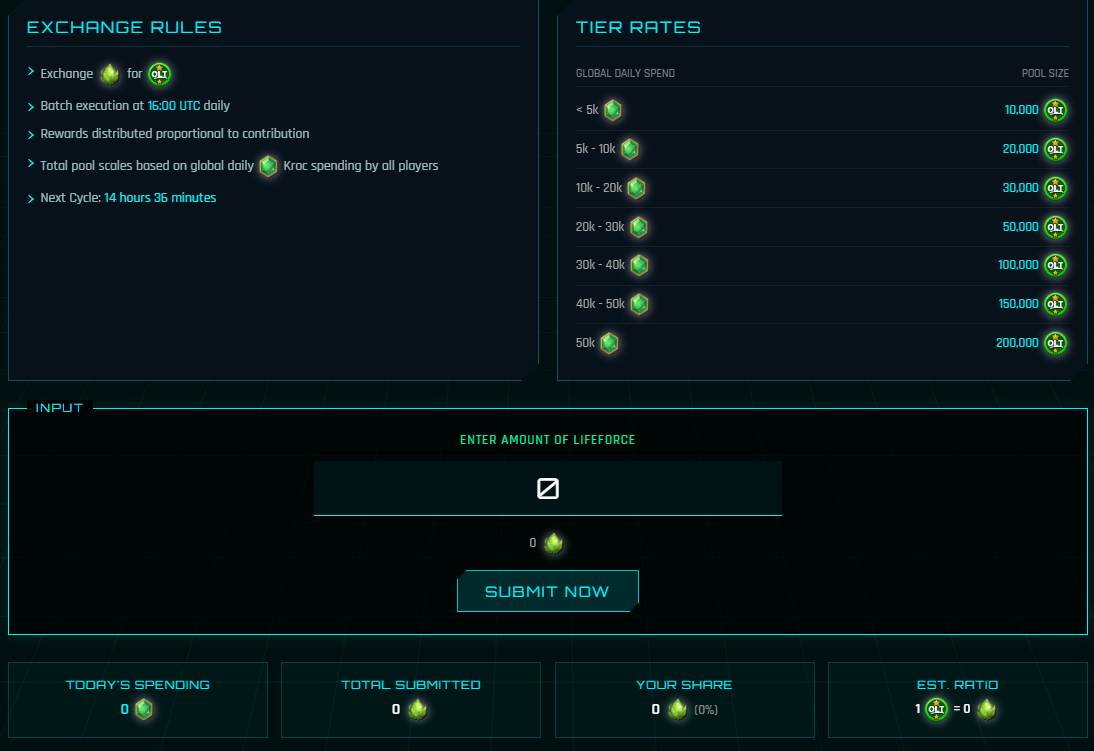
Players can exchange their Lifeforces into OLT Tokens via the FBX System. All exchanges are batch processed daily at 16:00 UTC, which means the final exchange ratio is only calculated and finalized at that time.
How to Access
- Go to Trade → FBX System.
- Shortcut: Click the Lifeforces icon at the top of the Main Interface for direct access.
Summary Flow
Credits → Lifeforce → FBX → OLT
How It Works?
- Step 1: Obtain Credits
- Earn Credits through various gameplay activities such as Encounters, Missions, A.R.C Quests, and passive generators. (See Credits for all sources).
- Step 2: Obtain Lifeforce
- Spend your Credits to mine on Planets, or obtain Lifeforce through alternative ways. (See Lifeforces for full mining mechanics and sources).
- Step 3: Submit to the FBX
- Go to the FBX System tab and submit your Lifeforces.